iPhone & Android VPN Usage Warning: What It Really Means
I almost deleted a perfectly good VPN app last December because of a headline I misread.
The phrase “iPhone Android VPN usage warning” had been bouncing around my feeds for weeks. It sounded like Apple or Google had started flagging VPN users—a quiet notification telling you to disconnect, maybe even a security alert built into the operating system. That’s not what it is. Not even close.
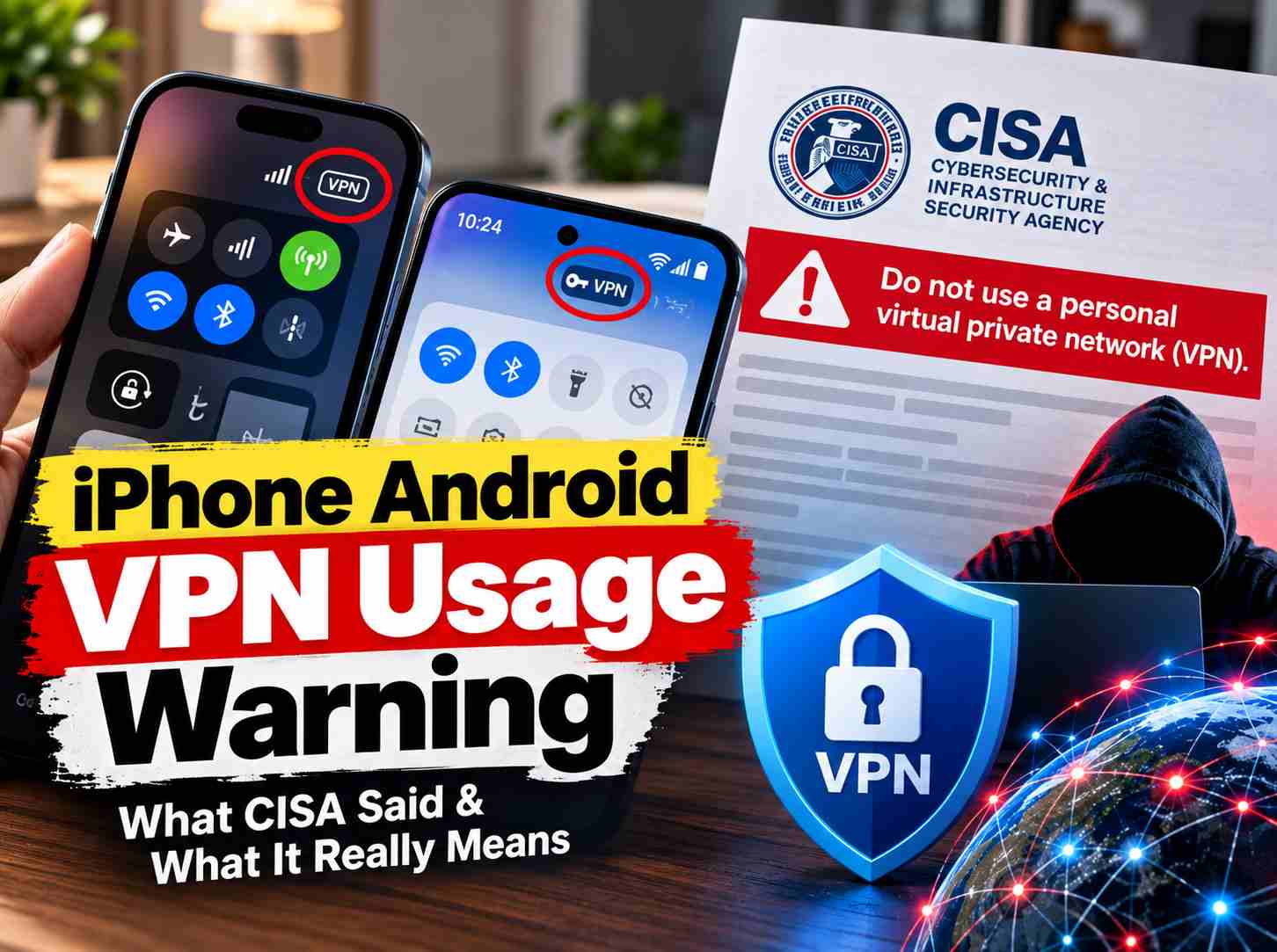
Here’s what I found when I actually traced the warning to its source: the Cybersecurity and Infrastructure Security Agency published guidance in December 2024 telling people, in direct language, “Do not use a personal virtual private network (VPN).” That’s the warning. It’s not a phone notification. It’s a government advisory. And it’s aimed at a very specific category of VPN—the free, unaudited apps you downloaded because they had a five-star rating and no monthly fee.
Meanwhile, the “VPN” icon in your status bar is doing something entirely different. It just tells you a VPN is connected. It says nothing about whether that VPN is trustworthy.
If you searched for this phrase because you saw “VPN” appear on your phone screen, you’re looking at the wrong thing. If you searched because you’re trying to decide whether to keep the free VPN app you installed last year, keep reading. That’s the question worth answering.
A Reddit user on r/TOR recently asked: “Isn’t the whole point of using a VPN to not be monitored? Why does Apple insist they have rights to monitor activity?”
That single question captures the confusion behind one of the most misunderstood phrases right now: the “iPhone Android VPN usage warning.”
The phrase had been bouncing around my feeds for weeks. It sounded like Apple or Google had started flagging VPN users, a quiet notification telling you to disconnect, maybe even a security alert built into the operating system.
Here’s what I found when I actually traced the warning to its source: the Cybersecurity and Infrastructure Security Agency published guidance in December 2024, “Do not use a personal virtual private network (VPN).” That’s the warning. It’s not a phone notification. It’s a government advisory. And it is for a very specific category of VPN: free, unaudited apps with an unclear earning model.
Meanwhile, the “VPN” icon in your status bar is doing something entirely different. It just tells you a VPN is connected. It says nothing about whether that VPN is trustworthy or whether it’s the kind CISA warns about.
What CISA Actually Said, and Who It Was For
CISA issued its Mobile Communications Best Practice Guidance in December 2024, after Chinese state-linked hackers breached multiple major US telecom carriers and intercepted call records belonging to senior officials. The guidance was written for what CISA calls “highly targeted individuals”, people in senior government or political roles likely to hold information a foreign intelligence service would want.
In the original text :
“Do not use a personal virtual private network (VPN). Personal VPNs simply shift residual risks from your internet service provider (ISP) to the VPN provider, often increasing the attack surface. Many free and commercial VPN providers have questionable security and privacy policies.”
CISA has since said the advice applies to everyone. The warning resurfaced in late 2025 as part of a broader alert about sophisticated commercial spyware aimed at ordinary users, not just officials.
But most coverage leaves out this detail: the same document carves out an explicit exception. “If your organization requires a VPN client to access its data, that is a different use case.” CISA is not telling employees to stop using a company-issued VPN for work systems. The warning targets the personal VPN apps people download on their own.
That distinction matters. And the research backs up why CISA is worried.
The Free VPN Ecosystem Is Measurably Dangerous
This isn’t government paranoia. Independent researchers have been testing these apps for years, and the findings are consistent and grim.
Kaspersky tracked a 2.5-times increase in malware-infected free VPN app installs during the 3rd quarter of 2024 alone, a trend that continued into the following quarter. The most dramatic example came earlier in 2024, when law enforcement dismantled a botnet called 911 S5 that had been built using free VPN apps including MaskVPN, DewVPN, and ShieldVPN. Users who installed those apps had their devices turned into proxy servers channeling other people’s traffic. The network spanned 19 million unique IP addresses across more than 190 countries, making it possibly the largest botnet ever created.
Separately, Top10VPN tested the 100 most popular free VPN apps for Android in the Google Play Store, apps with a combined 2.5 billion installs, and found that more than 10% suffered encryption failures, close to 90% leaked some form of user data, and about 70% requested at least one permission that put user privacy at risk.
Then there’s the ownership question. A Tech Transparency Project investigation found that roughly 20% of the popular free VPN apps it reviewed on the US App Store were secretly owned by Chinese companies, including at least one traced to a firm blacklisted by the US government over ties to the People’s Liberation Army.
A VPN routes every byte of your internet traffic through servers the provider controls. If that provider is unreliable, or answers to a government with broad legal authority to compel data sharing, the VPN hasn’t protected you. It has handed your browsing history to a new party.
The Icon in Your Status Bar Is Not a Warning
If you searched this phrase because you saw the word “VPN” appear on your screen, you’re looking at something entirely different from what CISA is talking about.
Both iOS and Android display an on-screen indicator whenever a VPN connection is active. On iPhone, it’s the letters “VPN” in the status bar. On Android, it’s a small key icon. This is a transparency feature, not a warning. It appears regardless of which VPN app you’re running or how trustworthy it is.
The icon tells you a VPN is connected. It says nothing about whether that VPN is one of the free, unaudited apps CISA is warning about, or a legitimate service with a verified no-logs policy. That’s the system working as designed.
So Do You Actually Need a Personal VPN?
The CISA guidance draws a real distinction that searches conflating it with a phone notification tend to miss. A VPN required by your employer for accessing work systems falls outside the warning entirely; CISA explicitly carves that use case out. A paid, independently audited consumer VPN with a documented no-logs policy is a different risk profile than a free app you downloaded because it had good reviews and no monthly fee.
If your goal is protecting data on public Wi-Fi, most everyday browsing today runs over HTTPS by default. By the end of 2025, HTTPS accounted for over 95% of observed web requests, with mobile connections reaching over 98%. HTTPS already encrypts the content of your connection independent of a VPN. The old advice about “always use a VPN on public Wi-Fi” was written for a time when most sites were unencrypted. That time is gone.
If your goal is to bypass regional content restrictions or hide your location from a specific service, a VPN still does that. But you’re accepting the exact risk CISA describes: moving your trust from your ISP to whichever company runs the VPN. That’s a trade-off, not a free upgrade.
The one scenario where a VPN still adds genuine security value is if you’re on a network you don’t trust and you’re accessing a service that doesn’t use HTTPS.
How to Tell If Your VPN Is One of the Risky Ones
If you do decide to keep using a personal VPN, for whatever reason, here are the signals that separate the risky apps from the ones that operate closer to what they advertise:
- The app is free with no subscription tier and no clear business model. This usually means it earns money by collecting and selling the data it claims to protect.
- It has no published privacy policy, or one that’s vague about what it collects and who it shares it with.
- Ownership is unclear or unverifiable. A quick search doesn’t turn up a real company behind the app.
- It has never undergone an independent security audit. No outside firm has verified its no-logs claims.
- It requests permissions that have nothing to do with routing network traffic, access to contacts, SMS messages, or the camera, for example.
- It lacks a kill switch, the feature that blocks internet access if the VPN connection drops. Without it, a disconnection can silently expose your real IP address and unencrypted traffic.
Paid VPNs aren’t automatically safe. But the incentive structure is different. A paid VPN has a subscription business model rather than one built on selling user data, and reputable paid providers are far more likely to have undergone independent security audits. Still, check each provider individually rather than assuming paid equals safe.
Conclusion
If you’re using a company-issued VPN for work, you’re fine. CISA’s guidance doesn’t apply to you. If you’re using a paid VPN with a verified no-logs policy and an independent audit, you’ve made an informed trade-off. If you’re using a free VPN you downloaded without researching the company behind it, that’s worth taking seriously.
Here’s what I’d do: open your phone’s settings, find your VPN configuration, and check which app is running. Then search for that app’s ownership and privacy policy. If you can’t find a real company behind it, or if the privacy policy is vague about data collection, delete it. You don’t need a VPN for everyday browsing on HTTPS. And the free ones are often selling exactly what they claim to protect.